How to make Tic Tac Toe console game using C# in Vs code?

Tic Tac Toe is a classic two-player game that can be easily implemented in C# using Visual Studio Code (VSCode). In this blog, I will guide you through the steps to make your own Tic Tac Toe game in C# with VSCode.
Let's Start!

Setup🧑💻
Step 1: Install Visual Studio Code
- If you don't have Visual Studio Code installed, download it from https://code.visualstudio.com/
Step 2: Install .NET Core
- To create a C# program, you need to have the .NET Core SDK installed. Download it from https://dotnet.microsoft.com/download
Let's build⚒️
Step 3: Create a new project
Open Visual Studio Code and press "Ctrl + Shift + P" to open the Command Palette.
Type "dotnet new console" and select "dotnet new console" from the list.
You will now have a new C# console project with a Program.cs file.
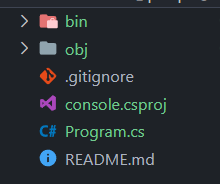
Step 4: Write the code in Program.cs file
Let's define the namespace
TicTacToeand make classProgram.using System; namespace TicTacToe { class Program { // Main code will be here } }Now define the constant values for your game board inside the
programclass.// Constant values for the size of the game board private const int ROWS = 3; private const int COLUMNS = 3; // 2D array to represent the game board private static char[,] board = new char[ROWS, COLUMNS];Then define the player. In your game, There are 2 players. They are: O and X.
  // Enum to represent the current player
  private enum Player
   {
     X, O
   }

  // Variable to store the current player
  private static Player currentPlayer = Player.X;
After that declare the
mainfunction.static void Main(string[] args) { // Core logic of the game will be here }Before writing the login inside the
mainfunction, let's declare and write the necessary function which will be required in the future.This will initialize the board.
  private static void InitializeBoard()
    {
      // Initialize the board with empty spaces
      for (int r = 0; r < ROWS; r++)
       {
        for (int c = 0; c < COLUMNS; c++)
           {
                      board[r, c] = ' ';
           }
       }
    }
This will print the layout of the board on the console screen.
  private static void PrintBoard()
  {
   // Print the current state of the board
   for (int r = 0; r < ROWS; r++)
     {
      Console.WriteLine("-------------");
      for (int c = 0; c < COLUMNS; c++)
        {
          Console.Write("| ");
          Console.Write(board[r, c]);
          Console.Write(" ");
        }
       Console.WriteLine("|");
     }
    Console.WriteLine("-------------")
  }
This will make a move by the input of user.
  private static bool MakeMove(int row, int column)
   {
    // Check if the move is valid (within the bounds of the board and on an                            empty square)
     if (row >= 0 && row < ROWS && column >= 0 && column < COLUMNS &&    board[row, column] == ' ')
       {
         // Mark the square with the current player's symbol
         board[row, column] = currentPlayer == Player.X ? 'X' : 'O';
         return true;
        }
      return false;
   }
This is the core function that checks the win.
  private static bool CheckForWin()
          {
              // Check rows
              for (int r = 0; r < ROWS; r++)
              {
                  if (board[r, 0] == board[r, 1] && board[r, 1] == board[r, 2] && board[r, 0] != ' ')
                  {
                      return true;
                  }
              }

              // Check columns
              for (int c = 0; c < COLUMNS; c++)
              {
                  if (board[0, c] == board[1, c] && board[1, c] == board[2, c] && board[0, c] != ' ')
                  {
                      return true;
                  }
              }

              // Check diagonals
              if (board[0, 0] == board[1, 1] && board[1, 1] == board[2, 2] && board[0, 0] != ' ')
              {
                  return true;
              }
              if (board[2, 0] == board[1, 1] && board[1, 1] == board[0, 2] && board[2, 0] != ' ')
              {
                  return true;
              }

              return false;
          }
If the board is full (When the game is drawn), This function will help to identify it.
  private static bool IsBoardFull()
    {
     for (int r = 0; r < ROWS; r++)
     {
       for (int c = 0; c < COLUMNS; c++)
         {
           if (board[r, c] == ' ')
              {
               return false;
              }
         }
     }
    return true;
   }
The last one will help to switch between the players.
  private static void TogglePlayer()
  {
    currentPlayer = currentPlayer == Player.X ? Player.O : Player.X;
  }
Now Let's write the
mainfunction.static void Main(string[] args) { InitializeBoard(); while (true) { PrintBoard(); Console.WriteLine($"Player {currentPlayer}, enter your move (row column): "); int row = Convert.ToInt32(Console.ReadLine()); int column = Convert.ToInt32(Console.ReadLine()); if (MakeMove(row, column)) { if (CheckForWin()) { PrintBoard(); Console.WriteLine($"Player {currentPlayer} wins!"); break; } else if (IsBoardFull()) { PrintBoard(); Console.WriteLine("It's a draw!"); break; } TogglePlayer(); } else { Console.WriteLine("Invalid move, try again."); } } }At first, Board is initialized by
InitializeBoard();function.Then, The while loop is declared.
After that, Board is printed by
PrintBoard()function.Then, Input is taken as row and column and the input given by the user is passed in
MakeMove(row,column)the function which checks it and make move if it is valid. if not then returnsInvalid move.After that,
CheckForWin()the function is used to find the winner of the game. If it returns true, the current player is declared the winner and game will be ended, if not thenIsBoardFull()is triggered to find whether the game board is full or not. if it returns true, then the game will be a draw. If not then, Player is switched byTogglePlayer()function.In this way, This game is played.
Quick Links🔗
Source code👉 Click here
Conclusion
In this way, We can make the console version of Tic Tac Toe game using c# language.
Thanks for reading🔥
About the author
Hey👋, It's me Utsav, I craft code and love to write what I learn.
Comments
Join the discussionNo comments yet. Be the first to comment.